
Collage maker with few options
Making a collage is a fun and enjoyable experience. Looking at a collage of all the pictures that you’ve collected can feel strangely satisfying. You can use powerful software like Photoshop to do it, but programs like those are extremely expensive. One alternative is the Free Photo Collage Maker by Media Freeware, but is it a good alternative? Does it have enough useful features for making collages to be able to go against powerful competitors like Photoshop?
Top Recommended Alternative

First Impressions
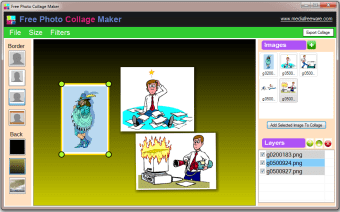
Installing the software wasn’t difficult which is definitely a point in the program’s favor. However, once you actually start to use the software, the points start to stack up against the Free Photo Collage Maker. First of all, the design and interface of the program is quite awful. The color scheme of the software is not cohesive at all. There is no single color that unifies the look of the entire program. Instead, the colors are all different and they all clash together. This wouldn’t be such a problem if it wasn’t so painful to the eye. In addition, the fonts are all different and the icons and buttons are a bit pixelated and rough. For something that revolves around creativity, it’s horribly designed.
The interface is simple and intuitive, but it could be better. It’s easy to understand, but the clutter of the design makes it feel so much more complicated than it really is.
Is It Functional?
In the strictest sense, yes, the Free Photo Collage Maker is functional. If all you need is a collage maker then this program can certainly do that. You can easily add images to make your collage. It’s also possible to arrange your images in any way that you want so that your collage has a little bit more flair to it. The program can also support layers. This allows you to edit and arrange your pictures without interfering with the other elements of your collage. You can also add borders to your image so that your collage looks fancier.
All these features aside, the Free Photo Collage Maker is actually very limited in terms of function. Arranging and resizing images is pretty difficult. There’s no option to keep images steady while you resize so you’ll end up with images in all sorts of orientation. You can also only edit each object individually. This means that you cannot edit the hue, saturation, brightness, and contrast of the entire collage. You will have to edit each one manually, one image at a time. Unsurprisingly, this is rather infuriating when you have a large number of images that you need to process.
There Are Better Alternatives
Even if all you want to do is make a collage, there are much better alternatives that you can look into if Photoshop is not in your budget. Even as a free program, the Free Photo Collage Maker simply offers too little to the user in order to be worthy of even a download. Go ahead and download it if you’re not too concerned with how the final collage turns out.